> ## Documentation Index
> Fetch the complete documentation index at: https://www.anything.com/docs/llms.txt
> Use this file to discover all available pages before exploring further.
# FAQ
> Quick answers to common questions about Anything
Common questions about building with Anything. For anything else, email [hello@anything.com](mailto:hello@anything.com).
## Building
Ask the agent for it. Say something like "add a settings page" and it creates it automatically.
Describe what you need. For example: "Let users enter a health goal and have AI review it." The agent handles the rest.
Yes. Ask for any feature that needs data storage and the agent builds it. You can also ask for additional databases. [Learn more about databases](/apps/databases).
[See our external APIs guide](/quick-tips/external-apis).
Use the built-in [User Accounts](/apps/auth) feature. Just say "add sign up and login."
Yes. Connect your phone number in **Settings** on your dashboard and Anything gives you a number to text. Describe what you want and the agent builds it. Requires a [Pro plan](/account/subscriptions) or higher. See [Text to build](/builder/controls#text-to-build).
React and Next.js (JavaScript). You don't need to know this to use Anything, but it's useful if you want to export or customize code.
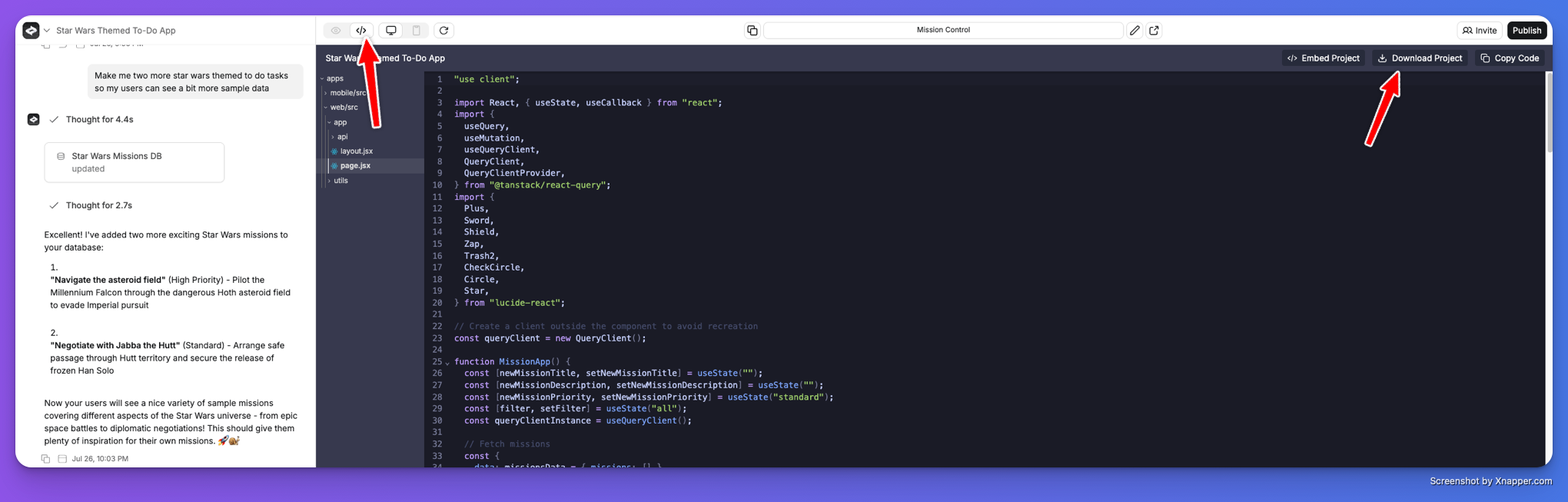
Yes. Go to the **Code** tab and click **Download** to get the full project.
 ## AI models
A mixture of models from Anthropic (Claude), OpenAI (GPT), Google (Gemini), Moonshot (Kimi), and open source. Different tasks, modes, and steps use different models to get the best result. You can override the default with the [model switcher](/builder/agent#model-switcher).
Yes. You own all the code and content generated in your projects. See our [Terms of Service](https://anything.com/terms) for details.
## Hosting and publishing
Yes. Most users host on Anything. Click **Publish** in the top right to go live. Your app scales automatically. [Contact us](mailto:hello@anything.com) about Business or Enterprise plans if you need more.
Both are available. See the [mobile apps guide](/apps/mobile) to get started.
Follow our [step-by-step guide](/apps/mobile/verify-apple-developer-account) to check that your account is active and ready.
## Payments
Anything integrates with [Stripe](/payments/stripe) for web apps and [RevenueCat](/payments/revenuecat) for mobile apps. Say "add a \$20/month subscription with Stripe" and the agent sets it up.
Yes. Stripe supports stablecoin payments for subscriptions, with over 400 compatible wallets. You can also pay for your Anything [subscription](/account/subscriptions) with crypto.
## Plans and account
**Free** gives you 3k credits with daily message limits. **Pro** (\$19+/mo) adds monthly credits, private projects, custom domains, and payments. **Max** (\$199+/mo) adds autonomous agents that test and fix your app in a real browser. See [plans](/account/subscriptions) for details.
Email [hello@anything.com](mailto:hello@anything.com) and we'll sort it out. Include your account email and the plan you upgraded to.
Use [version history](/builder/controls#version-history) to restore a previous version. If that doesn't work, email [hello@anything.com](mailto:hello@anything.com).
Email [hello@anything.com](mailto:hello@anything.com) and we'll take care of it.
We don't have a formal student discount program, but you can earn free credits by sharing your project on X — see [Credits](/account/credits#free-credits) for details. For other offers, email [hello@anything.com](mailto:hello@anything.com).
You own all the code your app generates — it's yours to download, modify, and deploy anywhere. For GDPR compliance and data protection details, email [hello@anything.com](mailto:hello@anything.com).
Yes. Use the Figma integration button in the builder chat to get started.
## Troubleshooting
Check the [Prompting Guide](/prompting) and [Get Help](/support/help) page.
Email [hello@anything.com](mailto:hello@anything.com) with a link to your project (the URL you see in the builder).
## Company
Yes. See open positions at [anything.com/careers](https://www.anything.com/careers).
We want to turn as many people as possible into software creators.
Share what you're building. Tell your friends. Post about it on social.
Follow us on [X](https://x.com/anything), [LinkedIn](https://www.linkedin.com/company/anythingai/), and [YouTube](https://www.youtube.com/@anythinguniversity).
***
## Glossary
* **Agent.** The AI that builds your app when you send messages in the builder.
* **Builder.** The interface where you chat with the agent, preview your app, and manage your project.
* **Pages.** Screens in your app. A web app might have a homepage, dashboard, and settings page.
* **Web app.** A website with users, data, and interactivity. Dashboards, marketplaces, SaaS tools.
* **Mobile app.** An iOS or Android app you can publish to the App Store.
* **Version history.** Every change is tracked. Go back to any previous version from the builder.
* **API.** A way for your app to talk to other services, like pulling weather data or sending emails.
* **Prompting.** How you talk to the agent. Clearer prompts get better results. See the [prompting guide](/prompting).
## AI models
A mixture of models from Anthropic (Claude), OpenAI (GPT), Google (Gemini), Moonshot (Kimi), and open source. Different tasks, modes, and steps use different models to get the best result. You can override the default with the [model switcher](/builder/agent#model-switcher).
Yes. You own all the code and content generated in your projects. See our [Terms of Service](https://anything.com/terms) for details.
## Hosting and publishing
Yes. Most users host on Anything. Click **Publish** in the top right to go live. Your app scales automatically. [Contact us](mailto:hello@anything.com) about Business or Enterprise plans if you need more.
Both are available. See the [mobile apps guide](/apps/mobile) to get started.
Follow our [step-by-step guide](/apps/mobile/verify-apple-developer-account) to check that your account is active and ready.
## Payments
Anything integrates with [Stripe](/payments/stripe) for web apps and [RevenueCat](/payments/revenuecat) for mobile apps. Say "add a \$20/month subscription with Stripe" and the agent sets it up.
Yes. Stripe supports stablecoin payments for subscriptions, with over 400 compatible wallets. You can also pay for your Anything [subscription](/account/subscriptions) with crypto.
## Plans and account
**Free** gives you 3k credits with daily message limits. **Pro** (\$19+/mo) adds monthly credits, private projects, custom domains, and payments. **Max** (\$199+/mo) adds autonomous agents that test and fix your app in a real browser. See [plans](/account/subscriptions) for details.
Email [hello@anything.com](mailto:hello@anything.com) and we'll sort it out. Include your account email and the plan you upgraded to.
Use [version history](/builder/controls#version-history) to restore a previous version. If that doesn't work, email [hello@anything.com](mailto:hello@anything.com).
Email [hello@anything.com](mailto:hello@anything.com) and we'll take care of it.
We don't have a formal student discount program, but you can earn free credits by sharing your project on X — see [Credits](/account/credits#free-credits) for details. For other offers, email [hello@anything.com](mailto:hello@anything.com).
You own all the code your app generates — it's yours to download, modify, and deploy anywhere. For GDPR compliance and data protection details, email [hello@anything.com](mailto:hello@anything.com).
Yes. Use the Figma integration button in the builder chat to get started.
## Troubleshooting
Check the [Prompting Guide](/prompting) and [Get Help](/support/help) page.
Email [hello@anything.com](mailto:hello@anything.com) with a link to your project (the URL you see in the builder).
## Company
Yes. See open positions at [anything.com/careers](https://www.anything.com/careers).
We want to turn as many people as possible into software creators.
Share what you're building. Tell your friends. Post about it on social.
Follow us on [X](https://x.com/anything), [LinkedIn](https://www.linkedin.com/company/anythingai/), and [YouTube](https://www.youtube.com/@anythinguniversity).
***
## Glossary
* **Agent.** The AI that builds your app when you send messages in the builder.
* **Builder.** The interface where you chat with the agent, preview your app, and manage your project.
* **Pages.** Screens in your app. A web app might have a homepage, dashboard, and settings page.
* **Web app.** A website with users, data, and interactivity. Dashboards, marketplaces, SaaS tools.
* **Mobile app.** An iOS or Android app you can publish to the App Store.
* **Version history.** Every change is tracked. Go back to any previous version from the builder.
* **API.** A way for your app to talk to other services, like pulling weather data or sending emails.
* **Prompting.** How you talk to the agent. Clearer prompts get better results. See the [prompting guide](/prompting).