For additional questions, email [email protected]
Simply prompt for it and the builder will create it automatically.
Request an integration from the builder, such as “I need users to enter a health goal and have it reviewed by AI”
Anthropic’s Claude Sonnet remains our top choice for development and is currently the only model available in Anything.
We continuously test models for quality, our current default is Sonnet, with Sonnet 4.5 and Gemini 3 Pro still in testing/beta.
Yes. Prompt for any feature requiring data storage and it will be built automatically. You can also request additional databases. More information here
Yes, most users host their projects on Anything. Click Publish in the top right to deploy. Your application will scale to handle many users. Contact us about Business or Enterprise plans for additional concerns.
Use our built-in User Accounts feature.
Anything generates JavaScript web applications using React/Next.js and backend serverless functions.
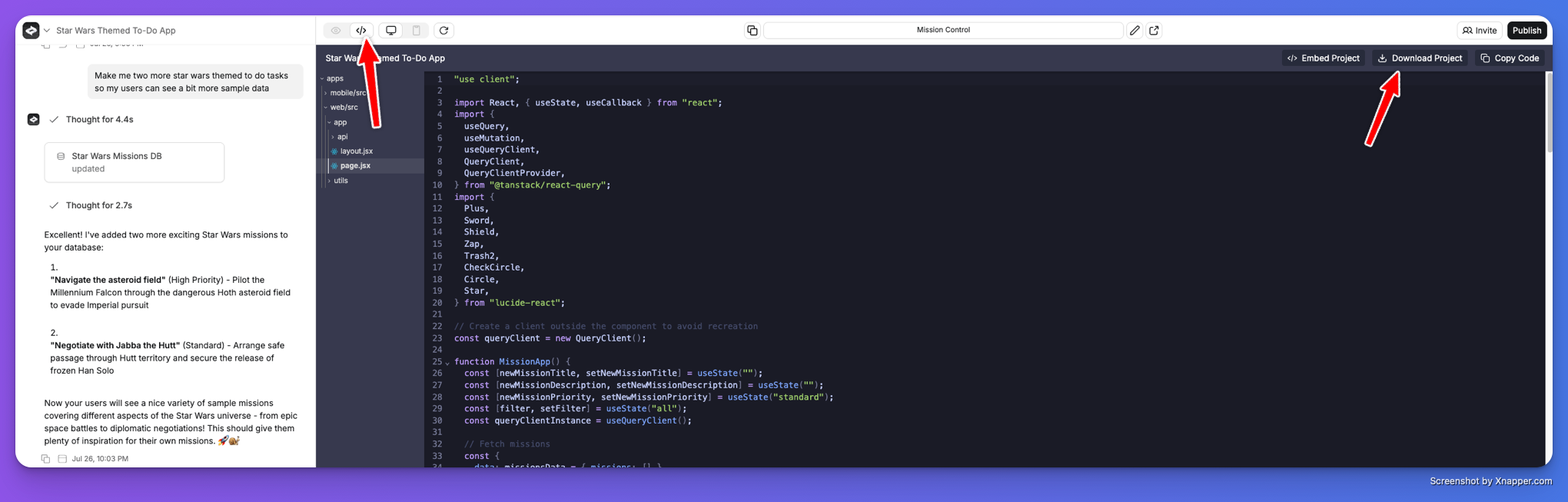
Yes. Navigate to the Code tab and click Download to get the Next.js project.Code Download
Check our Guide to Prompting and Get Help page for solutions.
We integrate directly with Stripe to help you collect payments.
Yes! Stripe now supports stablecoin payments for subscriptions, allowing you to accept crypto payments from over 400 supported wallets. You can also pay for your Anything Subscription with Crypto as well. Learn more about Stripe’s stablecoin payments.
Use the Version History option to attempt restoration. Email us at [email protected] for additional assistance.
Thank you for your feedback. Email us at [email protected] and include a link to the /build route (the URL you see when in the builder) for your project.
Free includes a one-time credit allotment and daily generation limits. Anything Pro provides renewing monthly credits, private projects, custom domains, and priority AI models. Choose your credit tier based on your needs.
Yes, view our open positions at create.xyz/careers.
We want to enable as many people as possible to become software creators and entrepreneurs.
The most effective way to support us is by happy users sharing with friends and colleagues, spreading the word on social media platforms, and writing tutorials and testimonials.Please consider following us on: https://x.com/anythingai https://www.linkedin.com/company/anythingai/ https://www.youtube.com/@anythinguniversity
Available now. Visit this article to get started with mobile app development.
Please follow these quick steps and let us know the result (screenshots help if anything looks different):1. Check your Apple Developer Program membershipGo to: https://developer.apple.com/accountSign in with the Apple ID you used to enroll in the Apple Developer Program.In the left menu, click Membership.Check the fields:
  • Program Type should say Individual or Organization.
  • Status must say Active (not Pending, Expired, or Incomplete).
👉 If you see a button like “Join the Apple Developer Program” or the status is not Active, your enrollment isn’t complete yet and you’ll need to finish or renew it.2. Confirm you can access App Store ConnectGo to: https://appstoreconnect.apple.comSign in with the same Apple ID.You should see the main dashboard with tiles like Apps (or “My Apps”), Users and Access, etc.👉 If you see a message saying you’re not enrolled or don’t have access, your account is not yet ready. In that case, please complete your enrollment on the Apple Developer site or contact Apple Support.3. Make sure agreements are active (important for publishing)While still in App Store Connect, click Business (top menu).Click Agreements, Tax, and Banking.In the list of agreements, check that:
  • Any required agreements show Active.
  • There are no items marked Pending, Incomplete, or Expired and no warning banners.
If you plan to have paid apps or in-app purchases, the Paid Apps Agreement must also be Active.4. What to send back to usPlease reply with:
  • Whether your Membership status is Active (and Program Type: Individual or Organization).
  • Whether you can see Apps/My Apps in App Store Connect.
  • Whether any agreements are Pending/Expired under Agreements, Tax, and Banking.
Screenshots of:
  • The Membership page
  • The Agreements, Tax, and Banking page (if anything looks unclear)
Once all of the above are OK, your account is fully set up and we can publish apps using it. ✅
Please email us via [email protected] with this request. Thank you!

Common terms